Weather & Clock Widget1.21
Publisher Description
You can choose from three widgets:
Widget one 4x2:
- displays date and time
- current location
- weather forecast (min-max today temperature)
- current temperature
- current weather description
- humidity, pressure, cloudiness, wind speed
Widget small 2x1:
- date and time
- current temperature
Lockscreen widget 4x4 - work best at lock screen for android 4.4 tablet
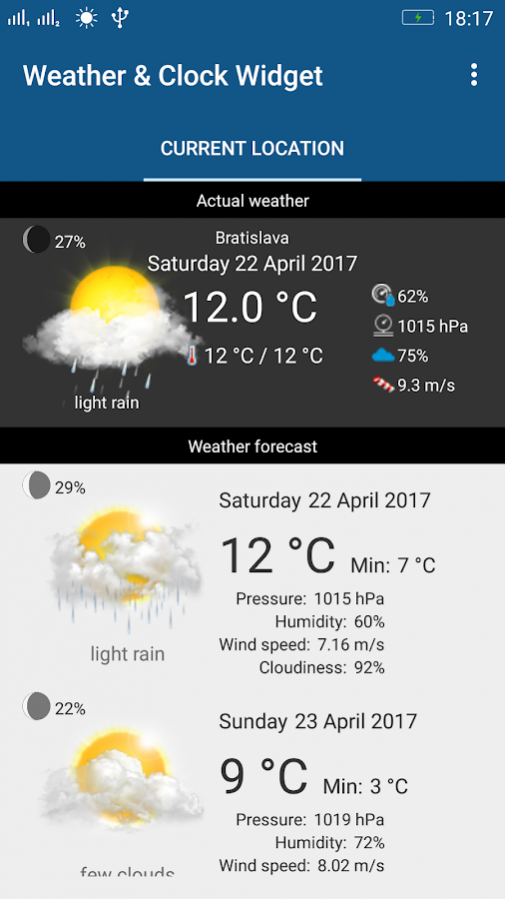
After taping widget main aplication display:
- actual weather information
- weather forecast list for next 7 days
- rainfall radar
Other screens
- manage locations
- actual moon phase, next full(new) moon date
Daydream function - allow screensaver when while charging or in docking station, Open system Settings->Display->Daydream(or open from app settings screen) and select "Weather &Clock Widget" as you daydreram app. The brightness of daydream can be set in the application settings screen.
About Weather & Clock Widget
The company that develops Weather & Clock Widget is Vladimír Bučko. The latest version released by its developer is 1.21.
To install Weather & Clock Widget on your Android device, just click the green Continue To App button above to start the installation process. The app is listed on our website since 2019-07-26 and was downloaded 31 times. We have already checked if the download link is safe, however for your own protection we recommend that you scan the downloaded app with your antivirus. Your antivirus may detect the Weather & Clock Widget as malware as malware if the download link to com.vbucko.weatherandclockwidget is broken.
How to install Weather & Clock Widget on your Android device:
- Click on the Continue To App button on our website. This will redirect you to Google Play.
- Once the Weather & Clock Widget is shown in the Google Play listing of your Android device, you can start its download and installation. Tap on the Install button located below the search bar and to the right of the app icon.
- A pop-up window with the permissions required by Weather & Clock Widget will be shown. Click on Accept to continue the process.
- Weather & Clock Widget will be downloaded onto your device, displaying a progress. Once the download completes, the installation will start and you'll get a notification after the installation is finished.
Program Details
System requirements
Download information
Pricing
Version History
version 1.21
posted on 2019-07-26
Stability improvement
